AI for Order Processing: The Wholesaler's ROI Guide
AI for order processing cuts order-entry errors and frees ops staff. Realistic costs, savings, and how to tell whether it is the right first automation for you.
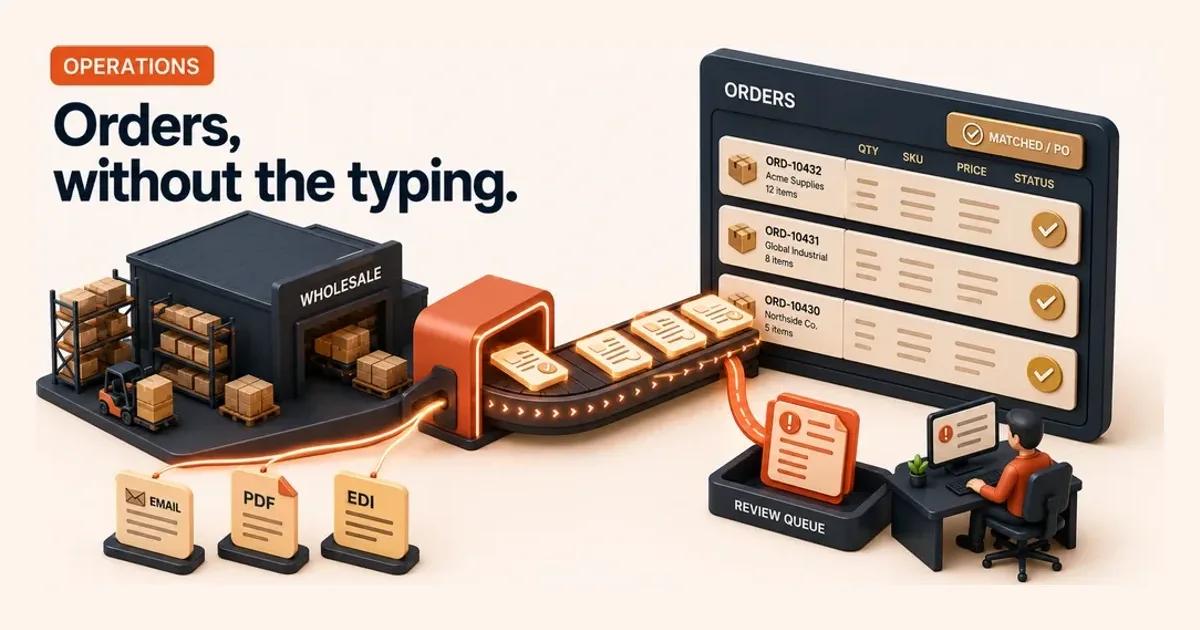
If your team still re-keys orders from email and PDF into the ERP, AI for order processing is one of the clearest automation wins a wholesaler has. It reads inbound orders, extracts the line items, matches them to your catalogue and customer record, and drafts the order for a human to confirm. Anything unusual routes to a review queue. The result is fewer hours lost to typing, fewer order errors reaching customers, and ops staff freed for work that actually needs judgement. Here is how it works, what it costs, and how to tell if it is your right first move.
Quick Answer. AI for order processing reads orders from email, PDF, and EDI, extracts line items, matches them to your catalogue and customers, and drafts them into your ERP, sending exceptions to a human queue. For high-volume wholesalers with messy inbound formats, it cuts re-keying hours and order-entry errors fast.
How AI Actually Processes a Wholesale Order
| Step | What the system does | What it never does |
|---|---|---|
| Ingest and read | Pulls orders from a monitored inbox, EDI feed or upload folder, including PDFs and scans, into structured fields | Guess at content it cannot read |
| Extract and match | Pulls quantities, SKUs and references, matches each line to the catalogue and the order to a known account with its pricing and terms | Match against master data it does not have |
| Draft into the ERP | Assembles a draft sales order in the system of record, ready for confirmation | Post it blind |
| Flag exceptions | Sends unrecognised codes, odd quantities, off-contract prices, credit holds and stockout lines to a human queue | Resolve them itself |
Manual order entry is a deceptively expensive process. An order arrives as an email body, a PDF purchase order, a scanned sheet or a number typed into a form from a phone call. Someone reads it, finds the right products in the ERP, checks the price and the customer's terms, and keys the lines in. Multiply that by hundreds of orders a day and you have a full-time cost centre that also happens to be your revenue's front door.
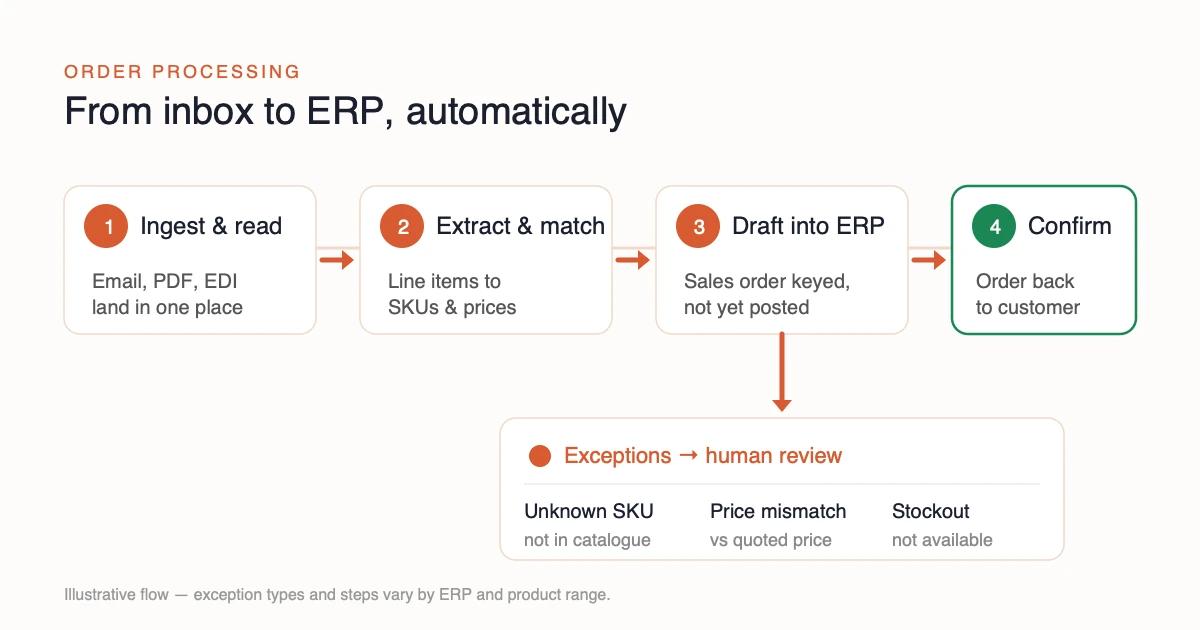
AI restructures that flow without removing the human from the decisions that matter. A typical implementation works in four steps:
- Ingest and read. The system pulls orders from a monitored inbox, EDI feed, or upload folder. It reads the content, including PDFs and scanned documents, into structured fields.
- Extract and match. It pulls out quantities, SKUs, and references. Then it matches each line to your product catalogue and the order to a known customer account, applying their pricing and terms.
- Draft into the ERP. It assembles a draft sales order in your system of record, ready for confirmation, not posted blind.
- Flag exceptions. Anything it is unsure about goes to a human review queue instead of being guessed at. That means an unrecognised product code, an odd quantity, a price that does not match the contract, a customer on credit hold, or a line that would trigger a stockout.
The repetitive reading and keying, the part that causes fatigue errors, is automated. The exceptions, which are exactly the cases that need a person, are surfaced clearly. That division of labour is the whole point.
The ROI: Where the Savings (and Errors) Actually Live
Two costs make order processing a strong automation candidate: the labour to key orders, and the cost of getting them wrong.
The error cost is real and measurable. Peer-reviewed research on data entry is consistent that manual single-entry produces error rates around 1% even with trained operators 1. The methods used to catch those errors are themselves imperfect and labour-intensive. In a wholesale context, a 1% line-error rate is not abstract. It is wrong quantities shipped, incorrect SKUs picked, credit notes raised, and customer trust spent. Every one of those errors carries downstream handling cost far larger than the original keystroke.
The labour cost compounds the problem. Smaller firms consistently lag larger ones in adopting the digital tools that lift productivity. The OECD has documented that this digital gap is a direct drag on SME productivity: the resources and skills to automate are exactly what smaller businesses tend to lack 2. Wholesale and distribution sit inside one of the most dynamic, churning parts of the UK economy, where margins are thin and operational efficiency decides who survives 3. Re-keying orders by hand is precisely the kind of low-value, high-volume work where that productivity gap is widest.
So the ROI case is straightforward to frame, even if the exact numbers are yours to measure:
- Recovered hours. A meaningful share of order-entry time returns to the team for exception handling, customer service, and supplier work.
- Lower error cost. Routing uncertain orders to review before they post catches mistakes that manual entry would have shipped.
- Faster order-to-cash. Orders drafted in minutes rather than hours move invoicing forward, tightening the order-to-cash cycle.
A fixed-price assessment that scores your repeatable processes will tell you whether order processing clears the bar on all three before you spend a penny on software. That is the discipline behind prioritising which processes to automate first rather than starting with the loudest vendor.
What It Costs — and Why the Software Is the Small Number
| Cost line | Where it sits | Appears on a vendor price page |
|---|---|---|
| Software licence | Usually the smallest line | Yes |
| ERP and EDI integration | Among the largest | No |
| Cleaning catalogue and customer master data | Among the largest, and it decides the exception rate | No |
| Designing the exception workflow | Non-negotiable, and skipping it is why projects stall after go-live | No |
The most common budgeting mistake is treating order processing automation as a software subscription. It is an integration project with a software component, and the proportions matter.
The software licence is usually the smallest line. The larger costs sit elsewhere. They are connecting the system to your ERP and EDI setup, cleaning the catalogue and customer data the AI has to match against, and designing the exception workflow so the right cases reach the right people. None of that appears on a vendor's price page, but all of it is non-negotiable. Skipping it is why automation projects stall after go-live. We unpack that gap in detail in the hidden IT integration debt behind AI tools.
This is also where the data dependency bites. AI matches incoming order lines against your master data. If your product codes are inconsistent, your pricing lives in three places, or your customer records are duplicated, the model will faithfully reproduce that mess at speed. Clean data is not a nice-to-have. It is the precondition. The same point appears across the public evidence on AI adoption. Organisations have to tackle data quality and ageing systems before AI delivers, not after 4.
For budgeting, hold two things in mind. First, the realistic payback comes from removing a meaningful share of manual order-entry hours plus the error-correction work behind them. Model that against your own volumes, not a vendor's case study. Second, a phased implementation roadmap that proves savings on one channel before widening scope beats a big-bang rollout every time. An assessment priced by region (UK £2,690 excl VAT, with EE €2,090, WE €2,690, and US $3,490 tiers) will size this honestly. AI Priority Map backs it with 100% money-back if no measurable-savings process is found.
Running the Exception Queue, Where the Savings Actually Land
The automation does not hand you processed orders. It hands you processed orders and a queue, and the queue is the new job. Firms that treat it as an afterthought get the tool's cost without its return, because every order the model declines to guess at still needs a person, and that person needs a place to stand.
Staff it with the people who used to key the orders. They already know which customer always orders in cases rather than units, and which supplier code changed last spring. The work changes from typing to judging, which is the point of the exercise, and it is also why the redeployment argument in scale, don't cut applies directly here. A new hire would need six months to learn what your existing team already carries.
Expect the rate to start high and fall. In the first week almost everything unfamiliar lands in the queue: an abbreviation in a customer's product description, a delivery instruction the system has never seen, a price that is right but not on the current sheet. That is the automation working as designed. Each of those is a correction to your catalogue mapping or your customer aliases, and each correction removes a whole class of future exceptions rather than one order.
A queue that never shrinks is telling you something. If the rate is still where it started after a month, the problem is not the model. It is the master data underneath it, which is the same dependency this article named earlier, arriving as an operational symptom instead of a project risk. The fix is upstream in the catalogue, not in the tool's settings.
The failure that looks like success
A queue that shrinks fast can be worse than one that does not. Review is judgement work under time pressure, and the fastest way to clear a queue is to approve everything in it. That produces a healthy-looking dashboard and a rising number of credit notes two weeks later, which is the original error cost wearing a new label.
So measure the queue and its consequences together. Four numbers are enough:
| What to track | Why it matters | What a bad reading looks like |
|---|---|---|
| Exception rate, weekly | Whether the automation is learning your data | Flat after four weeks |
| Median time an exception waits | Whether the queue is genuinely staffed | Growing while the rate is stable |
| Corrections raised downstream | Whether review is real or rubber-stamping | Falling queue, rising credit notes |
| Orders posted without review | The scope you have actually automated | Rising without a decision to widen it |
The last row is the one most firms never set. Widening the automation's remit, letting more order types post straight through, should be a decision someone makes and records, not something that happens because a threshold was left where the vendor set it.
When to widen the scope
Widen when a category of exception has been arriving and being approved unchanged for several weeks. That pattern says the model is right about that category and a person is confirming it out of habit, which is exactly the work worth removing next. Widen one category at a time, and keep the manual path available, because the first month of any change puts orders back in the queue that used to sail through.
⚠️ Do not widen on the aggregate rate. A single well-behaved category can pull the overall number down while a genuinely difficult one stays as error-prone as it was on day one, and an average that hides that is the reason the category view exists.
Some categories should stay in the queue permanently, and saying so up front stops them being read as failures later. A new customer's first order, anything on a credit hold, and any line that would take stock below a contracted commitment are commercial decisions rather than extraction problems. The model can read those orders perfectly and still have nothing useful to say about whether you want to fill them. Routing them to a person by design is a smaller standing cost than discovering the exposure after the fact.
When Order Processing Is NOT Your First Automation
Order processing is a strong default for wholesalers, but it is the wrong first move for some businesses. An honest assessment will say so.
It is a poor fit when:
- Your volume is low. If you process a handful of orders a day, the integration cost will dwarf the labour saved. The maths only works at volume.
- Your data is the real bottleneck. If your catalogue, pricing, and customer records are unreliable, automating on top of them produces wrong orders faster. Fix the master data first. That is the higher-ROI project, and trying to skip it is the classic failure mode.
- Your orders already flow cleanly through EDI. If most inbound orders arrive as well-mapped EDI and post straight through, there is little manual keying left to remove. AI earns its keep on the messy non-EDI tail: email, PDF, scanned, and phone orders. It does not earn it on channels that are already structured.
- A different process is bleeding more. Sometimes the bigger pain is invoice handling or support load, not order entry. If accounts payable automation or support triage is where your hours and errors concentrate, start there instead.
The honest test is comparative, not absolute. Order processing has to beat your other candidates on return, suitability, and risk, not merely look automatable in isolation. That comparison is exactly what a structured scoring exercise exists to make. Our guide to how to prioritise AI use cases walks through the trade-off so you do not automate the loudest process instead of the most profitable one.
Your Monday-Morning Move
You do not need a strategy offsite to start. You need an hour and a notebook.
First, measure the manual tail. For one week, count how many orders arrive outside clean EDI (email, PDF, scanned, phone) and roughly how long your team spends keying them. That number is your savings ceiling. Second, spot-check accuracy: pull twenty recent orders and look for entry errors, wrong SKUs, or quantity mismatches. That tells you the hidden error cost manual entry is already imposing. Third, sanity-check your data: can you trust your product codes and customer records, or is master data the project that has to come first?
Those three answers tell you whether order processing is your right first automation, or whether something underneath it needs fixing before any tool can help. The next step is to score it properly against your other options rather than backing a hunch. AI Priority Map's AI Foundation Audit scores every repeatable process in your business and ranks the top three opportunities by ROI plus suitability, minus risk. It ships a phased implementation roadmap you can act on. Start with the framework that sits behind it: the SMB AI opportunity assessment.
Summary
AI for order processing — from inbox to ERP
│
├─ How it works
│   ├─ Ingest & read — email / PDF / EDI into structured fields
│   ├─ Extract & match — SKUs, prices, customer terms
│   ├─ Draft into the ERP — ready to confirm, not posted blind
│   └─ Flag exceptions — unknown SKU or price mismatch → human
│
├─ The ROI
│   ├─ Recovered hours — re-keying time back to the team
│   ├─ Lower error cost — ~1% manual error caught before posting
│   └─ Faster order-to-cash — drafted in minutes, not hours
│
└─ Before you start
    ├─ Cost — software is the small number; data & oversight aren't
    └─ Not first if — low volume, exceptions dominate, messy data
Related insights
- Which Processes Should an SMB Automate First? — the prioritisation logic that decides whether order processing beats your other candidates.
- AI for Accounts Payable Automation — the sibling back-office process that often competes with order entry for first place.
- The SMB AI Opportunity Assessment — the cornerstone framework for ranking every automation opportunity by ROI, suitability, and risk.
Last updated: June 2026. Version 1.0.
Frequently Asked Questions
What does AI for order processing actually automate in a wholesale business?
How much does order processing automation cost a small business, and what's the payback?
Is order processing the right first process to automate?
Will AI order processing make mistakes my customers see?
How does AI order processing handle EDI orders we already receive electronically?
How long does it take to get order processing automation live?
Sources
- 1.Comparing the accuracy and speed of four data-checking methods — Barchard, Freeman, Ochoa & Stephens — Behavior Research Methods (peer-reviewed) · 2020
- 2.The Digital Transformation of SMEs — OECD · 2021
- 3.Trends in UK Business Dynamism and Productivity: 2025 — UK Office for National Statistics (ONS) · 2025
- 4.Use of Artificial Intelligence in Government — UK National Audit Office (NAO) · 2024
Want this run on your business?
AI Foundation Audit — a structured assessment of your AI footprint: integration risks, governance gaps, ROI opportunities. Delivered as a comprehensive report you can act on.
You receive your AI Opportunity Report and Implementation Brief — tailored to your business and delivered immediately.