AI for Accounts Payable Automation: A UK Small Business Guide
AI for accounts payable automation reads invoices, matches purchase orders and routes exceptions. What it realistically saves a small business.
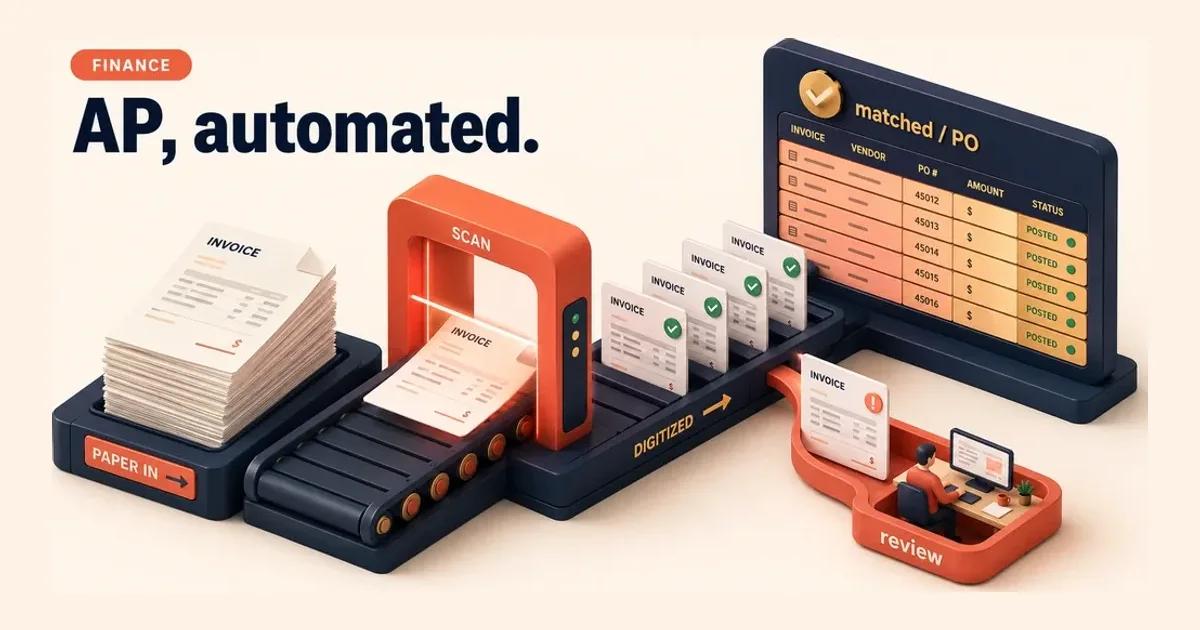
Accounts payable is one of the most automatable processes in a typical UK SMB, because invoice handling is high-volume, rule-bound, and repeated thousands of times a month. AI for accounts payable automation reads incoming invoices, matches them to purchase orders, flags exceptions, and routes only the uncertain cases to a person. Done well, it lowers the cost of processing each invoice and cuts the late-payment risk that drains SME cash flow. But AP is not automatically the right first move for every business. This guide covers what it realistically costs and saves, where it fails, and how to decide if AP is your highest-ROI starting point.
Quick Answer. AI for accounts payable automation extracts invoice data, matches it to purchase orders, and routes exceptions to a human, raising straight-through processing and cutting cost per invoice. It suits high-volume, repeatable AP with bounded error risk. It is the wrong first move when invoice volume is low or supplier data is fragmented.
Why accounts payable is a strong AI automation candidate
Three properties make a process worth automating early: it happens often, it follows rules, and a mistake is caught before it does damage. Accounts payable scores on all three. Invoices arrive constantly, the logic of three-way matching (invoice against purchase order against goods received) is well defined, and a human approval gate sits naturally between extraction and payment.
The cost case is concrete. APQC's cross-industry benchmarking finds that the total cost to process a single invoice ranges from under £2 for top performers to roughly £8 or more for weaker ones, with the gap driven largely by manual keying and exception handling 1. Most SMBs sit toward the expensive end, because their AP runs on email, spreadsheets, and a part-time finance hand keying figures by sight. If you process 1,500 invoices a month at the wrong end of that range, the manual overhead is material and recoverable.
The second saving is harder to see on a cost-per-invoice line but matters more to an owner: cash flow. Late payments are a structural drag on UK small business. The Department for Business and Trade put the cost of late payments to the economy at around £11 billion a year when it announced its 2024 reform package, and tied delayed invoicing directly to thousands of avoidable business closures 2. Faster, cleaner AP processing means you pay on terms, capture early-payment discounts, and dispute errors before they age, all of which protect working capital.
What AI actually does in an AP workflow
| Step | What the system does | Where the human stays |
|---|---|---|
| Extraction | Reads the invoice semantically, locating supplier, total, VAT, currency, PO number and line items whatever the layout, with a confidence score per field | Reviews low-confidence fields |
| Matching | Reconciles the invoice against the purchase order and, where available, the goods-received note | Clean matches pass straight through; discrepancies are held |
| Exception routing | Sends anything uncertain or rule-breaching to a queue with full context attached | Resolves it, and the system learns the pattern |
| Posting and approval | Posts the validated invoice to the ledger and routes it by your authorisation limits | Payment stays under human control outside a tightly defined low-value band |
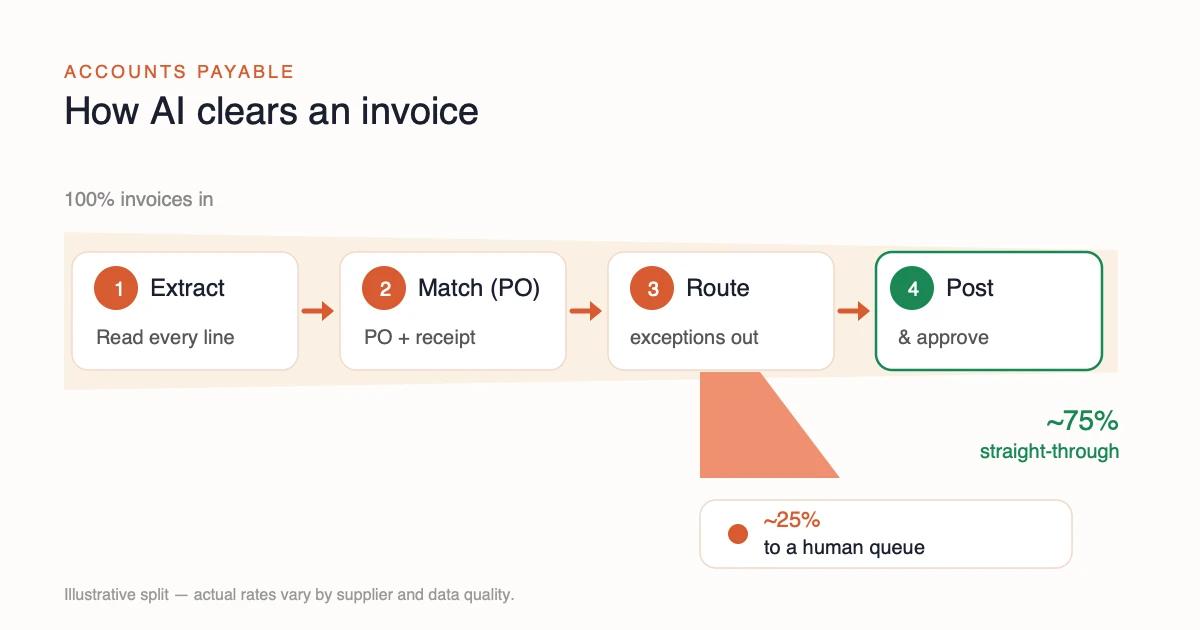
It helps to be precise about what the technology does, because "AI invoice processing" is sold loosely. There are four steps, and a human stays involved across them.
First, extraction. AI-based extraction reads an invoice and interprets it semantically rather than against a fixed template. It locates the supplier, total, VAT, currency, PO number, and line items regardless of layout, and it attaches a confidence score to each field. This is the meaningful advance over older OCR, which broke whenever a supplier changed their invoice format and forced you to maintain a template per vendor.
Second, matching. The system reconciles the invoice against the purchase order and, where available, the goods-received note. Clean matches can pass straight through. Discrepancies, a price that does not match the PO, a quantity that is off, a supplier you have never seen, get held.
Third, exception routing. The design earns its keep here. Anything the model is unsure about, or anything that breaches a rule you set, goes to a human queue with full context attached, rather than into a general inbox. A person resolves it and the system learns the pattern.
Fourth, posting and approval. The validated invoice is posted to the ledger and routed for approval according to your authorisation limits. Payment itself stays under human control for anything outside a tightly defined, low-value, trusted band.
The shape that works for an SMB is straight-through processing for the easy 70-80% of invoices, and a well-routed exception queue for the rest. That is the human-in-the-loop discipline that keeps automation safe and auditable; we cover the broader principle in human-in-the-loop design discipline.
What automation changes about AP fraud, and what it does not
Accounts payable is the process where your business writes cheques, so it is the process attackers work hardest on. Any honest account of automating it has to say what the automation moves, because the answer is not "nothing" and it is not "it makes fraud impossible" either.
Straight-through processing widens the window by design. The gain described above is that the easy majority of invoices post without a person reading them. That is the saving. It is also, in the same motion, the removal of the incidental human glance that used to catch the odd invoice that looked wrong for reasons nobody had written down. The control does not disappear, but it stops being free, and it has to be rebuilt deliberately as a rule rather than assumed as a habit.
The highest-value attack is not a fake invoice. It is a change to a real supplier's bank details, sent from a plausible address, on an invoice for work you genuinely commissioned. Three-way matching does not catch it, because the purchase order, the goods received and the invoice all agree. The only thing that is wrong is where the money goes, and that is the one field the match does not check.
⛔ So bank details must never be an auto-updating extracted field. Extraction can read them. Writing them to the supplier master is a separate, human, out-of-band action: a call to a number you already held, not the number on the invoice. This is the single most valuable rule in this section, and it costs nothing to adopt on day one.
Where the controls sit once the workflow is automated
| Attack | Does matching catch it? | The control that does |
|---|---|---|
| Invoice for goods never ordered | Yes, no matching PO | Three-way match, already in the design |
| Inflated price or quantity | Yes, PO mismatch | Tolerance thresholds, set deliberately |
| Duplicate of a real invoice | Sometimes | Duplicate detection on supplier, amount, date and invoice number together |
| Changed supplier bank details | No | Out-of-band verification before the master is edited |
| Invoice just under an approval limit | No | Reviewing the pattern, not the single invoice |
The last row is the one automation genuinely helps with, and it is worth naming because it inverts the usual story. A person approving invoices one at a time cannot see that a supplier's amounts have been creeping toward the threshold for four months. A system that holds every posting can be asked that question directly. Automation is weaker than a human at judging one document and much stronger at seeing a pattern across a thousand, so the controls worth building are the ones that need the second ability.
An approval limit is a delegation rule, not a fraud control. It says who may authorise what. It says nothing about whether the payee is who they claim to be, and treating it as protection is how firms end up authorising a fraudulent payment correctly, at the right level, with a complete audit trail. Keep the limits, and add a payee check that is independent of them.
Finally, the audit position genuinely improves, which the compliance section returns to below. Every automated action is timestamped and reconstructable, so the question "who changed this supplier's bank details, and when" has an answer. In a manual AP function that answer usually depends on whether someone remembers.
Three rules cover most of the exposure. Verify every bank-detail change out of band. Match duplicates on four fields at once, not on the invoice number alone. Review threshold patterns monthly rather than invoice by invoice. None of the three needs new software. All three need deciding before go-live, because each one is far cheaper to design in than to add to a workflow that is already posting payments.
When accounts payable is NOT your first automation
| Reason to wait | What makes it disqualifying |
|---|---|
| Invoice volume is low | At a few dozen a month, integration and supervision overhead swamps the per-invoice saving |
| Supplier and ERP data is fragmented | Duplicate supplier masters, POs in another system, or spend with no PO leave nothing reliable to reconcile against |
| The ERP has no usable API | Invoices can be read but not written back, so you automate half a process and keep the slow half |
| Another process scores higher | A high-volume order-processing or triage workflow may be a faster, cheaper, lower-risk first win |
Here is the part most vendors skip. AP is a strong candidate, not a universal one. There are clear cases where automating it first is the wrong call, and an honest assessment will tell you so.
Your invoice volume is low. If you process a few dozen invoices a month, the saving on cost per invoice is small in absolute terms, and the integration and supervision overhead swamps it. Volume is what turns a per-invoice efficiency into real money.
Your supplier and ERP data is fragmented. AI extraction is only as good as the records it matches against. If your supplier master is full of duplicates, your POs live in a different system from your invoices, or half your spend has no PO at all, the model has nothing reliable to reconcile to. You would be automating on top of a broken foundation, and the exception rate would stay high enough to wipe out the gain. Fix the data question first; we discuss this trap in hidden IT integration debt.
Your ERP has no usable API. If invoices can be read but not written back to the system of record without manual re-keying, you have automated half a process and kept the slow half. The integration cost can exceed the saving.
A different process scores higher. Even when AP is automatable, it may not be your best first bet. A high-volume order-processing or customer-triage workflow might offer a faster, cheaper, lower-risk win. The right question is never "can we automate AP" but "which process gives us the best return for the least risk." That is exactly what a structured assessment answers, and it is why we score every repeatable process rather than assuming the obvious one wins. See which processes to automate first.
If two or more of these apply to you, AP is probably not your first move. That is a useful finding, not a failure.
What it costs, what it saves, and the compliance line
Treat the cost in two parts. There is the build, which is dominated not by the AI licence but by data clean-up and integration, and there is the ongoing run, which is comparatively small once the workflow is stable. The single biggest variable in the build is the state of your supplier data and the quality of your ERP integration. Two firms with identical invoice volumes can face very different bills purely on data readiness.
On the saving side, model your own numbers rather than borrowing a headline. Take your real monthly invoice volume, your current blended cost per invoice, and a conservative straight-through rate, then apply the saving only to the invoices that will actually pass automatically. The exception queue still costs staff time; the gain is the difference, not the gross. As an illustrative, typical-range example: a firm processing 1,500 invoices a month, moving 75% to straight-through at a meaningfully lower cost per invoice, recovers a substantial slice of a finance hire's time, but your figure will differ.
On compliance, the line is clear and manageable. Under UK GDPR, decisions made solely by automated means that significantly affect a person generally require meaningful human involvement 4. For accounts payable this is rarely a blocker, because you keep a person on approvals and exceptions anyway. Log every automated action, retain the audit trail, and keep payment authorisation under human control. Handled this way, automation tends to improve your audit position: every step is timestamped and reconstructable, which is more than can be said for an invoice approved by a forwarded email. The government's own Prompt Payment and Cash Flow Review underlines how much scrutiny now sits on payment practices, which is one more reason to make your AP traceable 3.
What to do Monday morning
You do not need a transformation programme to start. You need an honest measurement and a decision.
First, count and cost your invoices. Pull last month's invoice volume and estimate your true blended cost per invoice, including the hours spent on exceptions and chasing. Compare it against the benchmark range 1. This tells you whether the saving is even large enough to chase.
Second, check your data and integration readiness. Is your supplier master clean? Do invoices and POs live in systems that can talk to each other? Does your ERP expose an API you can write back to? Two honest "no" answers mean the foundation work comes before the AI, not after.
Third, compare AP against your other candidates. Do not commit to AP just because it is the obvious one. Score it against your other repeatable, high-volume processes, such as order processing automation, on return, suitability, and risk. The point is to pick the best first move, not the first move you thought of.
That comparison, done rigorously across every repeatable process and ranked by ROI plus suitability minus risk, is the core of an AI opportunity assessment for SMBs. It is the difference between automating the process that happens to be visible and automating the one that actually pays. If AP wins, you will start with confidence. If it does not, you will have saved yourself an expensive detour.
Summary
AI for Accounts Payable — when it pays, when it doesn't
│
├─ Why AP is a strong candidate
│   ├─ High volume — invoices arrive constantly, rule-bound
│   ├─ Cost — £8+ per invoice manual vs under £2 best
│   └─ Cash flow — fewer late payments, captured discounts
│
├─ How the workflow runs
│   ├─ Extract & match — read fields, reconcile to the PO
│   └─ Route — ~75% straight-through, ~25% to a human
│
└─ When AP is NOT first
    ├─ Low volume or fragmented supplier / ERP data
    └─ Another process scores higher on ROI vs risk
Related insights
- AI Opportunity Assessment for SMBs — the structured way to rank every process by ROI, suitability, and risk before you commit.
- Which Processes to Automate First — how to choose your highest-return first automation instead of the most obvious one.
- AI for Order Processing Automation — the sibling workflow AP most often competes with for first place.
Last updated: June 2026. Version 1.0.
Frequently Asked Questions
How much does AI for accounts payable automation actually save a UK small business?
Is accounts payable the right first process for a small business to automate with AI?
What is the difference between OCR and AI for invoice processing?
Does AI accounts payable automation create compliance or audit risk?
How long does it take to implement AI for accounts payable in a small business?
Should we automate accounts payable end to end or keep humans in the loop?
Sources
- 1.Total Cost to Process Accounts Payable per Invoice Processed — APQC (Open Standards Benchmarking) · 2024
- 2.Government takes action to back small businesses and tackle late payments — Department for Business and Trade — GOV.UK · 2024
- 3.Prompt Payment and Cash Flow Review — Department for Business and Trade — GOV.UK · 2025
- 4.Rights related to automated decision making including profiling — Information Commissioner's Office (ICO) · 2024
Want this run on your business?
AI Foundation Audit — a structured assessment of your AI footprint: integration risks, governance gaps, ROI opportunities. Delivered as a comprehensive report you can act on.
You receive your AI Opportunity Report and Implementation Brief — tailored to your business and delivered immediately.