AI Customer Support Triage: How to Automate the Queue
AI customer support triage automation classifies, prioritises and routes tickets faster without new headcount. What it costs, what it saves, and when it fits.
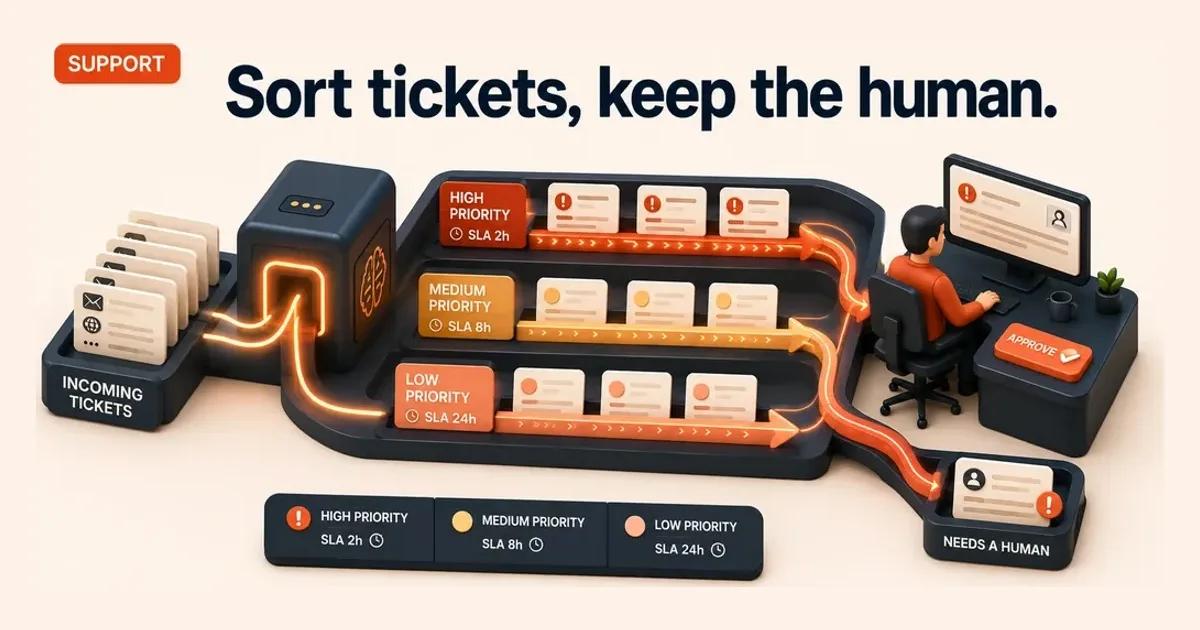
If your support queue is sorted by hand before anyone replies, that sorting is the slowest, least-skilled part of the day, and it is the part AI does best. AI customer support triage automation reads each incoming ticket, classifies the issue, sets a priority against your SLA, drafts a suggested response, and routes it to the right person, leaving a human to review and send. It adds speed and consistency to the front of the queue without adding headcount, and without handing the customer relationship to a machine. The question is whether triage is the right first move for you.
Quick Answer. AI customer support triage automation classifies, prioritises, drafts and routes incoming tickets so agents skip manual sorting and start work faster. A human reviews every outbound reply, so SLAs improve without new headcount. It fits SMBs with high, repetitive ticket volume and clean historical data to learn from.
What support triage automation actually does
| Step | What the system does |
|---|---|
| Classify | Labels the issue type: billing, returns, technical fault, account access, complaint |
| Prioritise | Scores urgency against your SLA, so a payment failure outranks a feature request |
| Draft | Produces a suggested reply from your knowledge base, for a human to edit and approve |
| Route | Sends the ticket and its draft to the right team or named agent, classification attached |
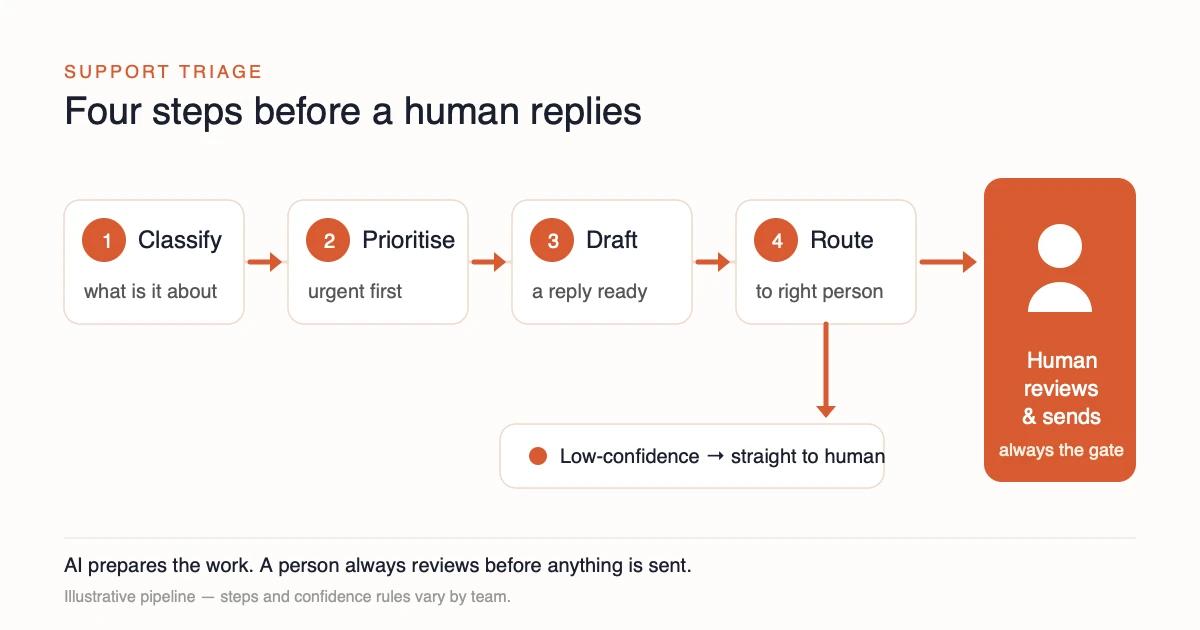
Triage is the work that happens before an agent starts replying. A ticket lands, and someone reads it, decides what it is about, judges how urgent it is, tags it, and pushes it to the right queue. In most SMBs that is manual, inconsistent, and done by whoever is free. AI does the same four steps in seconds:
- Classify. Read the ticket and label the issue type: billing, returns, technical fault, account access, complaint.
- Prioritise. Score urgency against your SLA so a payment failure outranks a feature request.
- Draft. Produce a suggested reply or next action from your knowledge base, for a human to edit and approve.
- Route. Send the ticket and its draft to the right team or named agent, with the classification attached.
The agent still owns the reply. They open a ticket that is already sorted, prioritised and drafted, and they decide what goes to the customer. The OECD surveyed over 5,000 SMEs across seven countries in 2024, including the UK. It found generative AI already in use in 31% of them, with reduced workload among the most commonly reported benefits 3. Support triage is one of the clearest places that workload reduction shows up, because the sorting is high-volume and repetitive while the judgement stays human.
This is deliberately narrower than a chatbot that answers customers directly. Triage assumes an agent stays in the loop and removes the friction in front of them. That makes it a lower-risk first automation, which matters when the alternative is letting a model speak to your customers unsupervised.
Triage vs deflection: why the distinction matters
| Triage | Deflection | |
|---|---|---|
| Who answers the customer | A person, always | A bot, with no agent involved |
| What it changes | Removes the manual preparation around every ticket | Tries to shrink the volume that reaches humans |
| Where it fails | Rarely, because the human decision stays with a person | Publicly, when the bot answers wrongly or escalates badly |
| Effect on complex tickets | Improves throughput on those too | Mishandles exactly those |
These two get sold as the same thing and they are not. Deflection tries to resolve the customer's query without any agent: a bot answers, the ticket never reaches a human. Triage assumes a human handles the ticket and removes the manual preparation around it.
Deflection is attractive because it promises to shrink volume. It is also where SMBs get burned, because a bot that answers wrongly or escalates badly damages the relationship in public. Triage keeps the human-facing decision with a person and improves throughput on every ticket, including the complex ones a deflection bot would mishandle. For most 10-500 employee teams, triage is the safer place to start and often the better return, because it lifts performance across the whole queue rather than skimming the easy questions.
The productivity case is well evidenced. A peer-reviewed study in the Quarterly Journal of Economics looked at customer-support agents using an AI assistant. It found a roughly 14% increase in issues resolved per hour, with the largest gains, around 35%, going to newer and lower-skilled agents 4. The mechanism matters for SMBs: AI lifts your less-experienced staff toward the performance of your best ones, which is exactly the gap a small team feels most.
How triage itself fails, and what to do about it
The comparison above is fair to triage, and it is slightly too comfortable. Keeping a person on the reply removes the failure that makes deflection dangerous. It does not remove the two failures that belong to triage, and both are quiet, which is what makes them worth naming.
The first is misrouting. A ticket classified as a billing query goes to the billing queue, and the billing team is the wrong team for a fault report that mentioned an invoice in passing. Nobody answers wrongly. The ticket simply waits in a place where the person who could resolve it will never look. Days later it surfaces as an SLA breach nobody can explain. The human safety net is real, but it only catches what reaches it.
The second is automation bias on the draft. An agent who opens a ticket with a suggested reply already written is doing a different job from an agent who opens a blank one. Editing is easier than composing, and that is the entire saving. It is also the mechanism. A confident, fluent, subtly wrong draft is far more likely to be sent than a blank box is to be filled in wrongly. The gain and the risk are the same property viewed twice.
Three controls, none of which need new software
| Failure | The signal that shows it | The control |
|---|---|---|
| Misrouting | Tickets reassigned between queues after first touch | Track reassignment rate as a first-class metric, not an anecdote |
| Automation bias | Drafts sent with little or no edit | Sample sent replies against the draft they came from, weekly |
| Silent low confidence | A queue whose ageing is worse than its volume explains | Route low-confidence tickets to a person unclassified, not to a guessed queue |
The third row is the one that costs nothing and is most often skipped. When the model is unsure, the tempting design is to make its best guess and let the human correct it. That converts an honest "I do not know" into a confident wrong label, and a wrong label sends the ticket somewhere before anyone reads it. A ticket the system cannot classify should arrive as unclassified, in a queue a person actually watches.
The categories that should never be routed automatically
Three kinds of ticket belong with a person from the first second. The rule is easier to hold if it is written before go-live rather than after an incident.
- A complaint. Once someone is unhappy, routing latency is part of the harm, and a complaint misfiled as a general query ages in the wrong queue while the customer waits.
- Any sign of vulnerability or distress. Bereavement, financial hardship, health, safeguarding. A model can be trained to spot the words. It should not be trusted to decide what they mean, and the cost of being wrong is not measured in SLA points.
- A legal or regulatory threat. A mention of a regulator, a solicitor, or a formal escalation changes who needs to see the ticket and how it must be recorded.
In practice the rule is a keyword list that routes to a named person rather than a queue. A queue has no owner outside working hours. A named person has a deputy.
None of these is a large volume in a typical SMB, which is exactly why routing them by hand is affordable. They are also the tickets where a routing mistake is least recoverable, so the arithmetic favours caution twice over.
What good looks like after a month
Reassignment rate should be falling, because each correction teaches the classifier a real distinction in your categories rather than a general one. Draft edit rate should be steady rather than falling to zero. A rate that collapses is not a sign the model got better. It is the signal that review has become a formality, which is the same shape as an approval queue cleared by approving everything.
⚠️ Measure the queue you route away from, not only the one you route to. A triage layer that quietly moves volume out of a busy queue looks like a success on that queue's dashboard. The receiving team is the one that finds out whether the classification was right.
None of this argues against triage. It argues for setting three numbers before you switch it on. Reassignment rate. Draft edit rate. Ageing on the receiving queue. Each takes minutes to define. Each is far harder to reconstruct later, because the baseline you would compare against is the month you have already stopped having. The controls are cheap. The evidence that they worked is only cheap if you start it early.
What it costs and what it realistically saves
Treat triage as a capacity decision, not a redundancy decision. The realistic saving is time per ticket and faster, steadier SLA compliance, not a smaller team. If the QJE figure holds even partway in your environment, an agent handling 40 tickets a day would handle 45 or 46 instead. That is the shape of the gain, multiplied across the team and across volume growth you would otherwise have to hire for 4.
Costs fall into three buckets. First, the tooling: a triage layer over your existing helpdesk, priced per agent or per ticket. Second, the integration and data work: connecting the model to your ticketing system, your knowledge base, and your routing rules, plus cleaning enough historical tickets for the classifier to learn your categories. Third, the oversight design: review steps, confidence routing, logging, and the SOP rewrite that names who approves what. The second and third buckets are where SMBs underbudget, and where a structured assessment earns its keep.
An AI Foundation Audit scores every repeatable process in your operation and ranks the top three opportunities by ROI, suitability and risk, so triage competes against your other candidates on evidence rather than enthusiasm. It is fixed-price (UK £2,690 excl VAT, with EU and US tiers), runs from a 40-90 minute wizard with a 24-hour turnaround, and ships a phased implementation roadmap. If we find no process with measurable savings, you get your money back. The point is to confirm triage is genuinely your best first move before you spend on it. For the wider method, see how to prioritise AI use cases and which processes to automate first.
When support triage is NOT your first automation
Triage is a strong default, but it is the wrong first move in several common situations, and the risks are real enough to take seriously.
It is the wrong choice when your bottleneck is upstream. If customers contact you because orders go wrong or invoices are late, fixing the support queue treats the symptom. Automating the source process, accounts payable or order processing, may rank higher on ROI because it cuts ticket volume at the root.
It is the wrong choice when your ticket data is thin or messy. A classifier learns from history. If your past tickets are untagged, inconsistent, or low-volume, the model has nothing reliable to learn your categories from, and accuracy suffers.
And it carries customer-facing failure modes you must design against:
- Misprioritisation. An urgent ticket scored as routine misses its SLA and a customer is left waiting on something that mattered.
- Misrouting. A wrong-team route adds a handoff and delay, the opposite of the intended benefit.
- Confident wrong drafts. A plausible but incorrect suggested reply, sent without review, reaches the customer as fact.
The mitigations are not optional. The NIST AI Risk Management Framework treats AI risk as socio-technical and calls for accountability, continuous monitoring and human oversight across the AI lifecycle, with its Govern, Map, Measure and Manage functions 1. In practice that means a human on every outbound reply, low-confidence tickets routed to a person rather than auto-handled, and a logged trail of every AI action so mistakes are auditable. There is also a legal floor: tickets contain personal data, so UK GDPR applies. Where a decision has legal or similarly significant effects on a person with no meaningful human involvement, the ICO's automated decision-making rules engage 2. Human-in-the-loop triage stays clear of that line by design, which is one more reason it is the right pattern for an SMB.
Your Monday-morning action
You do not need a strategy offsite to test whether triage fits. You need an honest look at your queue.
- Pull last month's tickets and check three things: total volume, how often you miss your SLA, and whether tickets are tagged consistently enough for a model to learn from.
- Find the routing tax. Estimate the minutes per ticket spent reading, tagging and routing before any reply is written. That is the work triage removes.
- Name the review owner. Decide who approves AI drafts before they reach customers. If you cannot name them, you are not ready to automate, you are ready to plan.
- Set the confidence rule. Agree that anything the model is unsure about goes to a human, not out the door.
If those four point to triage, the next step is to confirm it beats your other automation candidates rather than assuming it. Score it against the rest of your operation with the AI opportunity assessment for SMBs, our cornerstone guide to ranking processes by ROI, suitability and risk before you commit budget. The discipline of human oversight that makes triage safe makes any customer-facing automation safe. It is covered in human-in-the-loop design discipline. Get the sequence right and triage becomes a quiet, compounding win: faster service, steadier SLAs, no extra headcount, and the customer relationship still firmly in human hands.
Summary
AI support triage — sort tickets before the agent replies
│
├─ What it does
│   ├─ Classify — billing / returns / technical / account / complaint
│   ├─ Prioritise — score urgency against your SLA
│   ├─ Draft — a suggested reply from your knowledge base
│   └─ Route — to the right team; a human always sends
│
├─ Triage is not deflection
│   ├─ Deflection — a bot answers the customer (riskier)
│   └─ Triage — the human stays the gate, lifts the whole queue
│
└─ Cost & fit
    ├─ Saves — time per ticket, steadier SLAs (not headcount)
    └─ Not first if — low volume or messy historical data
Related insights
- AI Opportunity Assessment for SMBs — the cornerstone method for ranking every process by ROI, suitability and risk before you build.
- Human-in-the-Loop Design Discipline — how to keep oversight real, not tokenistic, on any customer-facing AI.
- AI for Order Processing Automation — a sibling process that often outranks triage when bad orders are what generate your tickets.
Last updated: June 2026. Version 1.0.
Frequently Asked Questions
What is AI customer support triage automation?
How is triage different from chatbot deflection?
Will AI triage let us cut customer-service headcount?
What are the main risks of automating support triage?
Do data protection rules apply to AI support triage in the UK?
How do we know if support triage is our best first automation?
Sources
- 1.Artificial Intelligence Risk Management Framework (AI RMF 1.0), NIST AI 100-1 — US National Institute of Standards and Technology (NIST) · 2023
- 2.Rights Related to Automated Decision Making Including Profiling — Information Commissioner's Office (ICO) · 2026
- 3.Generative AI and the SME Workforce: New Survey Evidence — OECD Publishing · 2025
- 4.Generative AI at Work, The Quarterly Journal of Economics (vol. 140, no. 2) — Brynjolfsson, Li & Raymond — Oxford University Press · 2025
Want this run on your business?
AI Foundation Audit — a structured assessment of your AI footprint: integration risks, governance gaps, ROI opportunities. Delivered as a comprehensive report you can act on.
You receive your AI Opportunity Report and Implementation Brief — tailored to your business and delivered immediately.